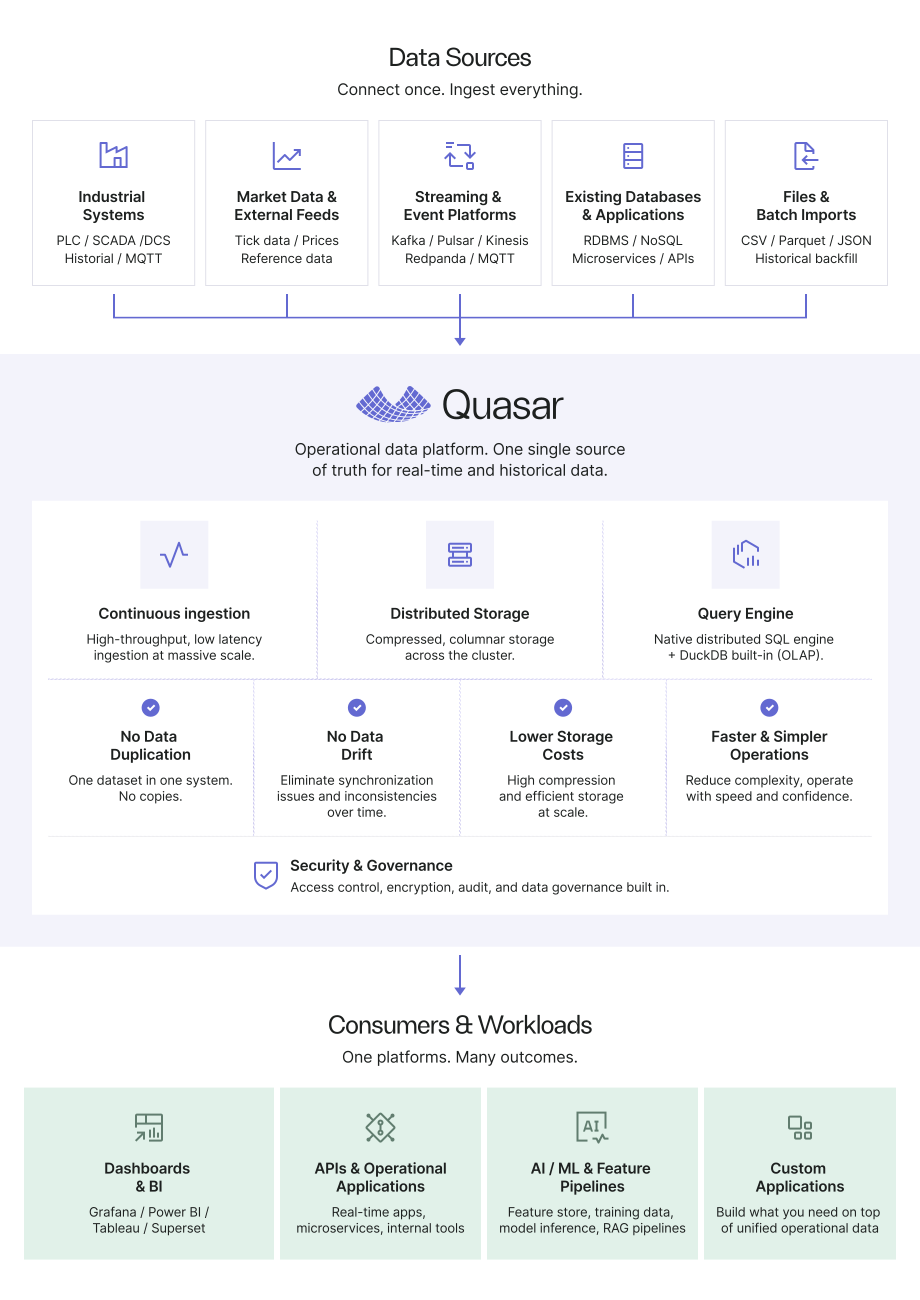
Quasar’s architecture
A distributed database for numerical and time-series data.
Continuous ingestion, compressed tiered storage, and analytical queries over the same live and historical dataset.
System Overview
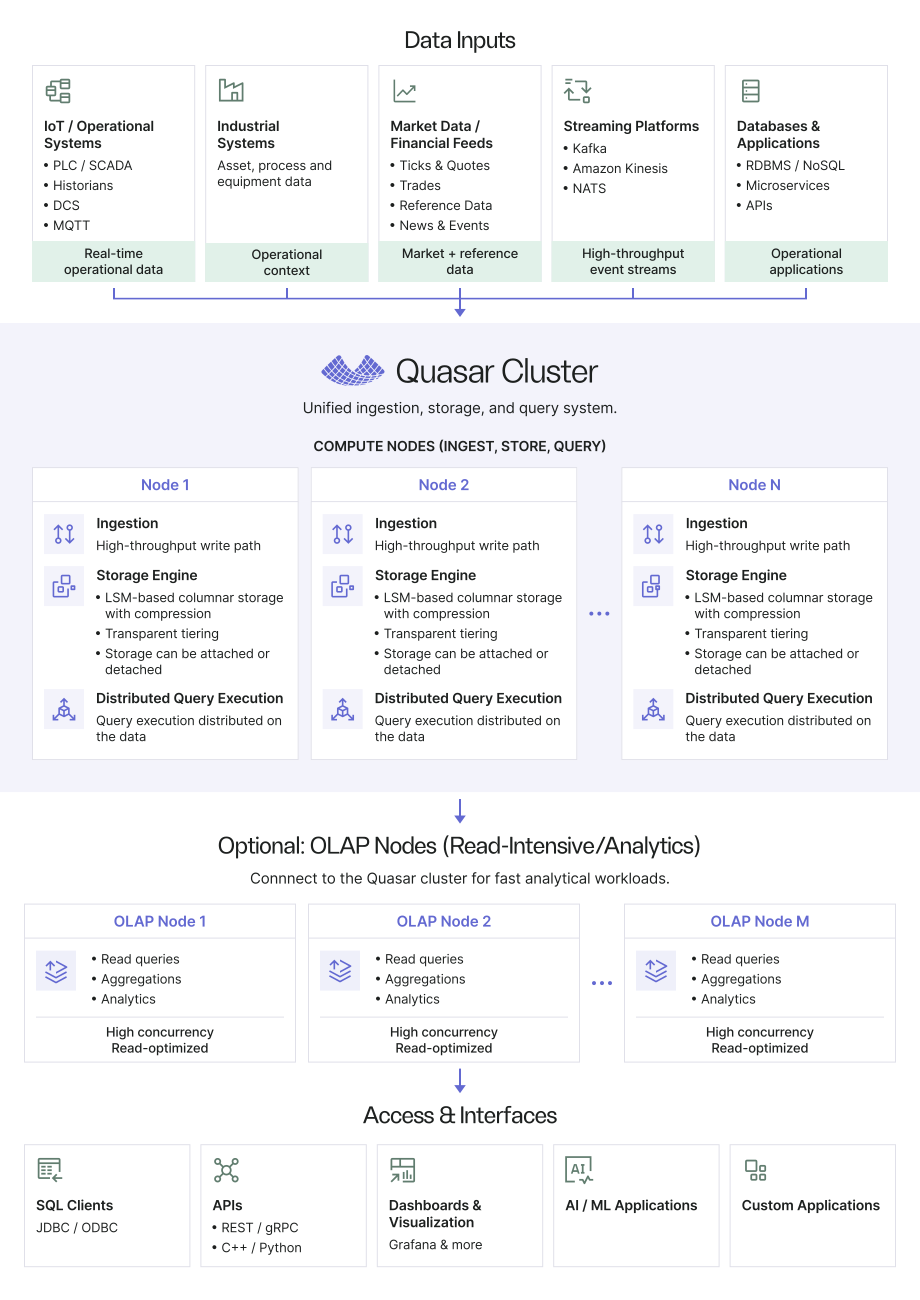
Quasar is a distributed, column-oriented database for large numerical and time-series datasets. Cluster nodes participate in ingestion, storage, and query execution.
The storage engine combines lossless numerical compression and tiered storage. Applications access the data through the native Quasar query engine and APIs, or through the DuckDB integration for SQL and OLAP workloads. Optional OLAP nodes can serve analytical queries over the same underlying dataset.
Core components
- Compute nodes for ingestion, storage, and distributed query execution
- Compressed columnar storage across local and external storage
- Native Quasar query engine and APIs
- DuckDB integration and optional OLAP nodes
Data Flow & Storage
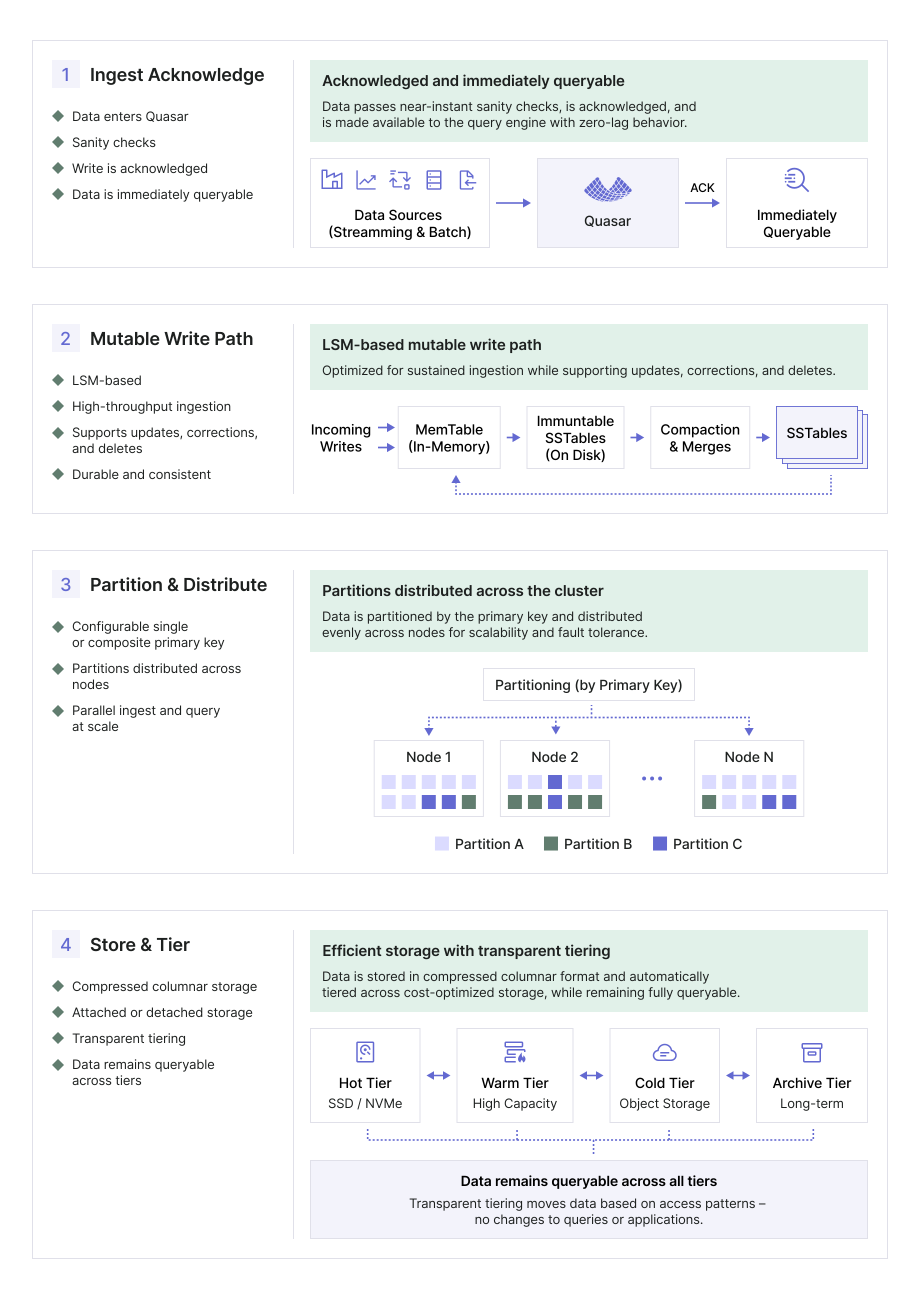
Quasar uses an LSM-based write path designed for sustained ingestion. It supports new observations, historical backfills, updates, corrections, and deletes. Data is organized into partitions distributed across the cluster, stored in compressed columnar format, and accessed across storage tiers.
Query visibility and persistence
Since Quasar 3.14.3, data accepted into an asynchronous pipeline is immediately available to queries, including deduplicated writes. The pipeline buffers accepted data in server memory and subsequently flushes it to disk.
A successful asynchronous push acknowledges acceptance into memory; disk persistence completes later. Applications choose an insertion mode according to their transactional and persistence requirements.
Storage properties
- Distributed data partitions
- Mutable data with updates, corrections, and deletes
- Lossless compression for numerical values
- Tiered storage across local and external storage
Query Execution
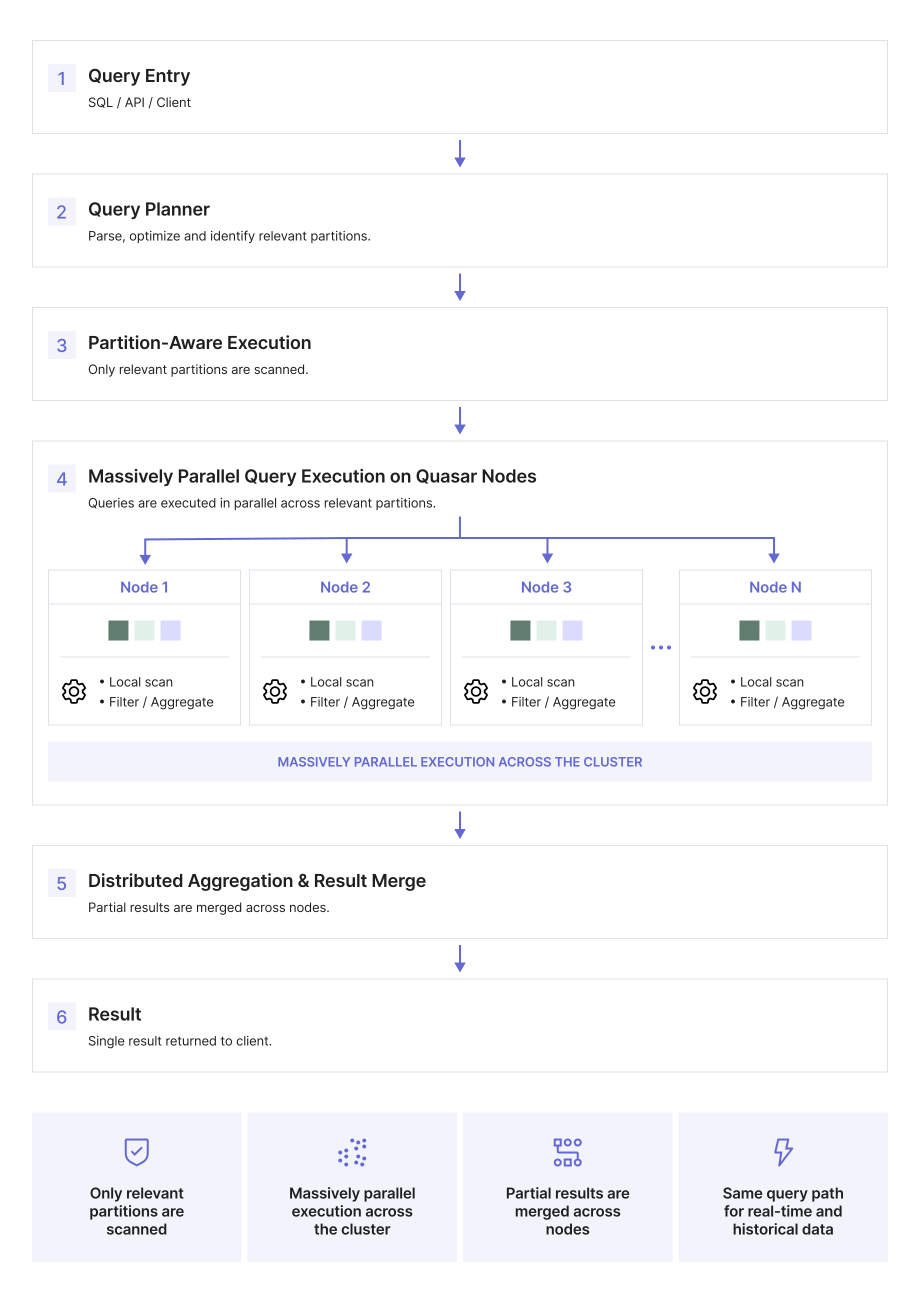
Quasar provides two complementary query paths over the same underlying dataset: the native Quasar engine and the DuckDB integration. Both can access live and historical data.
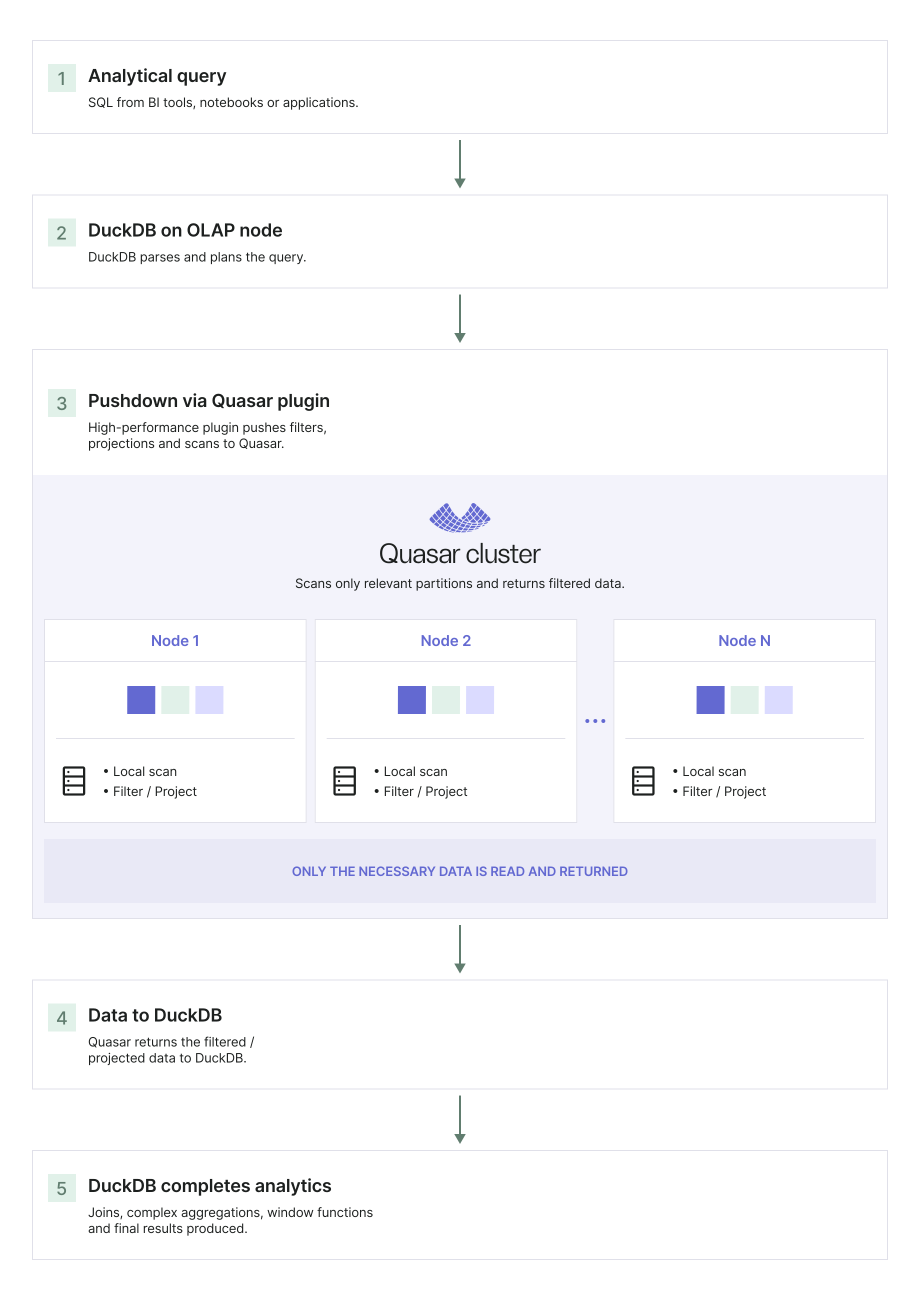
The native path distributes query work across Quasar nodes. In the DuckDB path, DuckDB plans the SQL query, pushes supported operations to Quasar, and completes the remaining analytical work. The integration lets teams use SQL tools without maintaining a separate warehouse copy solely for that query path.
Native Quasar queries
The native query path directs work to the relevant data partitions and executes it across Quasar nodes. Results are combined into a response for the application.
Use it for workflows built around Quasar’s query language, APIs, and distributed execution, including:
- Operational queries over incoming data
- Analytical operations across retained history
- Workloads using Quasar-specific query capabilities
- Applications integrating directly with Quasar clients and APIs
DuckDB SQL and OLAP
The DuckDB integration provides a SQL and OLAP query path. DuckDB parses and plans the query. Supported filters, scans, and projections are pushed down to Quasar where possible; DuckDB completes the remaining operations.
Use it for:
- Ad-hoc SQL exploration
- BI and dashboard workflows
- Joins, aggregations, and window functions
- Applications that benefit from DuckDB’s SQL ecosystem
The native Quasar and DuckDB paths have different SQL capabilities. Choose the path that supports the query and application you need.
Integration in your architecture
Start with a defined workload: its data sources, ingestion rate, retained history, queries, and operational requirements. Deploy Quasar alongside the systems already in use, then expand as the value is demonstrated.
Ingestion can use Quasar APIs, supported connectors, or integration work for the source system. Downstream applications access the data through native interfaces or the DuckDB SQL path.
Common integration patterns
- Keep historians for operational collection while serving deeper analytics from Quasar
- Ingest live streams and historical backfills into the same database
- Connect analytical tools through the appropriate SQL or API path
- Move selected workloads while retaining existing systems where they remain useful
Decide explicitly which system owns each source dataset and how corrections flow between systems.