
Where Quasar fits
● Where Quasar sits in the stack
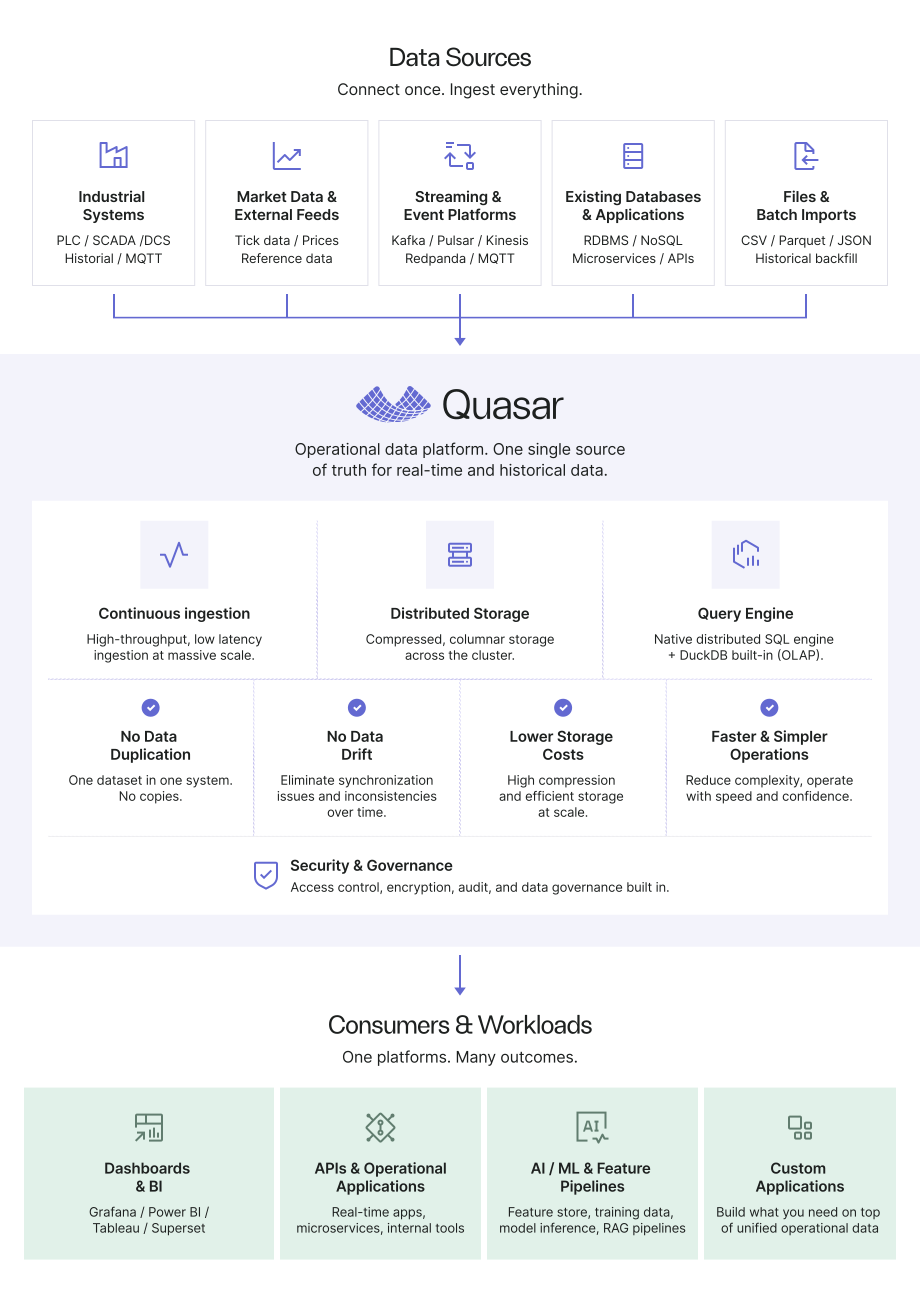
Quasar’s role
Quasar combines ingestion, compressed columnar storage, and distributed queries in one database. Native interfaces and the DuckDB integration provide complementary access paths over live and historical data.
It can serve a numerical or time-series workload alongside existing streaming systems, historians, lakes, and analytical platforms.
Start with a defined workload
Identify the data sources, ingestion rate, retention, queries, and operating requirements. Decide which systems remain responsible for collection, transport, storage, and downstream applications.
For example, keep a historian for operational monitoring while Quasar serves deeper analytics, or keep a streaming platform for event distribution while Quasar retains and queries the numerical history.
Expand as the value is demonstrated
Move additional workloads when the evaluation supports it. A deployment may complement existing systems or replace selected functions. Define the source of truth and how corrections propagate for each dataset.
● Quasar by system category
Keep event transport and distribution where they work well. Kafka, Kinesis, NATS, and other streaming platforms can continue serving their role in the architecture.
Feed Quasar through a supported connector or an API integration when numerical events also need retained storage and analytical access. Confirm the integration available for the specific platform.
Define event identity, ordering, retries, and backfills so the ingestion process has clear behavior when data arrives late or is replayed.
Keep operational collection, monitoring, and visualization in the historian where appropriate. Quasar can provide an additional data layer for analytical queries across assets, facilities, and retained history.
Agree how observations and context reach Quasar, how historical imports work, and how corrections are handled. Choose the storage and query layout for the analytical workload.
Keep the lake’s existing storage and processing role where it is useful. Quasar can serve a defined numerical workload that needs database queries over incoming and historical observations.
Choose which data belongs in Quasar, which remains in the lake, and whether transfers or exports are required. Account for retained copies, freshness, and storage responsibilities when comparing the architectures.
Evaluate the actual query and ingestion pattern rather than assuming that all lake-based or database-based approaches have the same cost or performance.
Keep broad BI, reporting, and analytical workloads on the appropriate platform. Quasar can serve numerical and time-series workloads where ingestion, retention, and concurrent analytical access need to be evaluated together.
Applications can query Quasar through its native engine and APIs, or through the DuckDB SQL path. These execution paths have different capabilities and should be chosen for the queries and tools in use.
Validate SQL compatibility, concurrency, and any data-transfer requirements using the intended deployment.
These are integration patterns. The right division of work depends on the specific products, configurations, and workload.
● Evaluate the fit on your workload
- Define the data. Identify numerical values, timestamps, event identifiers, late arrivals, and corrections. Set the history and resolution to retain.
- Replay ingestion and queries together. Test throughput, query latency, concurrency, and background work using a representative dataset.
- Check write and query behavior. Confirm visibility, persistence, transactional requirements, and the native or DuckDB query path the application will use.
- Define system ownership. Specify the source of truth, integration responsibilities, backup and recovery, and the way revisions move between systems.
- Compare the total deployment cost. Include the Quasar license, infrastructure, retained copies, support, and operating responsibilities at comparable service levels.